.svg)
Table of Contents
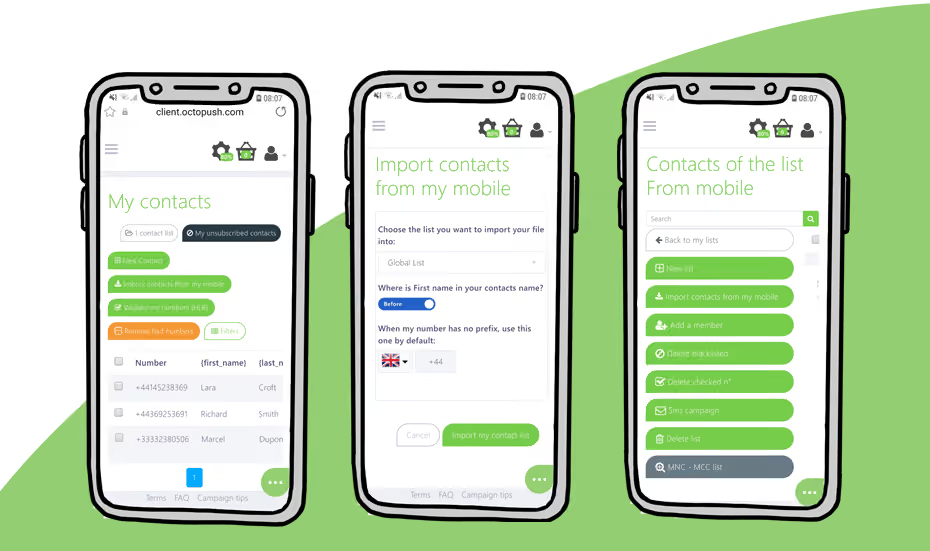
As a business owner, you know that leads can come when you least expect them and, sometimes, there is just not enough time to sit at your desk in front of your computer.
For those busy days, Octopush lets you transfer your phone contact list into your user platform straight from your mobile!
- Create an exclusive list for your mobile contacts or add them to your existing ones.
- The mobile list automatically adds your country code and identifies parameters such as first name and surname.
Use all the features you love with your contacts imported from your mobile. Such as:
- Send memorable SMS campaigns that you can create straight from your mobile.
- Edit your contacts from the platform, add custom parameters to personalise your text messages thanks to the parameters’ tags.
- Clean up unused or discontinued contacts using our HLR lookup service.
- Blacklist troublesome numbers
How to import your contacts from your mobile telephone
- Login to Octopush from your mobile device.
- Go to Contacts in the left side bar.
- Tap on “Import contacts from mobile”
You are all set!