Home
Blog

How to send an SMS Campaign with Octopush

How to send an SMS Campaign with Octopush

December 3, 2020

Table of Contents

Ready to send your first campaign?

Create your account in two minutes, no credit card required.

Create an account
Create an account
Create an account
Screen Shot 2020 02 14
  1. Sign in to your Octopush account or create a new one.
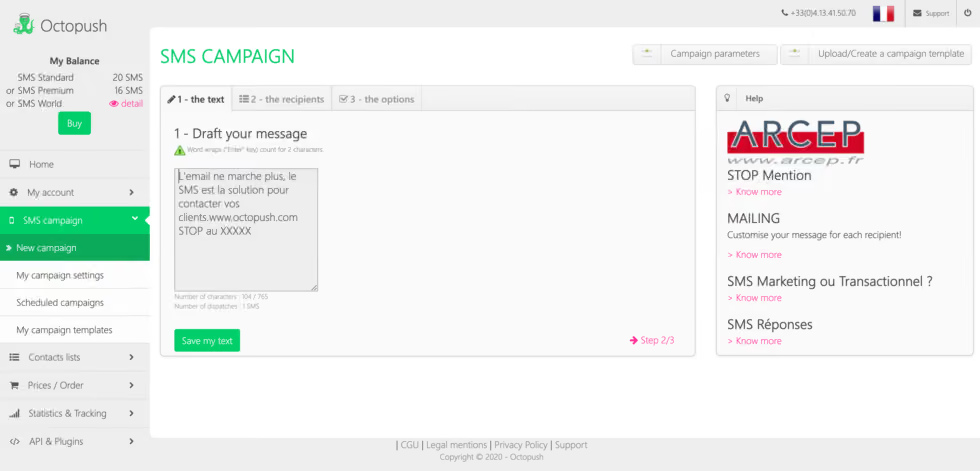
  2. Go to SMS Campaign and select New Campaign.
  3. Write the content of your message.
  4. Select one of your contact lists as your recipient, or type the numbers with country code one by one.
  5. Select the dispatch method, type and sender if required, and send a test sms before validating your campaign.
  6. Verify that all the parameters are correct and click “Send your Campaign”
  7. That’s it! You sent your first SMS campaign. You’ll see the ticket number that confirms all transactions.
  8. You can go to Statistiques & Tracking if you want to see the information of your sent campaigns.
FAQ

Frequently asked questions

Find answers to the most frequently asked questions about our platform, its features, and how to use it here.

Already used by over 4,000 users
No items found.
contact

Ready to send your first campaign?

Create your account in two minutes, no credit card required.
Get started for free
No commitment • no credit card required.