.svg)
Table of Contents
Do you run an e-commerce store? Are you struggling with your marketing campaigns because they’re actually more complicated than they seem? If you answered yes, then keep reading!
Estimated reading time: 6 minutes
In this post, we’ll show you:
- why you should add SMS as a marketing channel for your e-commerce store
- why automation is the path to a profitable SMS marketing strategy
- how to automate, step-by-step, three major e-commerce tools you’re probably already using
3 SMS automations for your e-commerce store
It is estimated that e-commerce will account for 16.1% of total retail sales worldwide in 2020, according to Statista. They will continue to grow to reach 22% by 2023, which means… great news for you!
Running an online store on your own, or even with a small team to help you, can take a lot of time and energy. It can be overwhelming and exhausting, but you can’t avoid the fact that having a defined marketing strategy is essential for a profitable business. You need to make smart decisions that will make a difference with the least amount of effort possible, so you’ll probably agree with me when I say that what e-commerce stores need is this:
- Making a big impact with the least possible investment.
- Automate, automate, automate
Let me explain a little more.
Why SMS?
For starters, we already know that SMS is the best marketing medium out there. We’ll let the numbers speak for themselves:
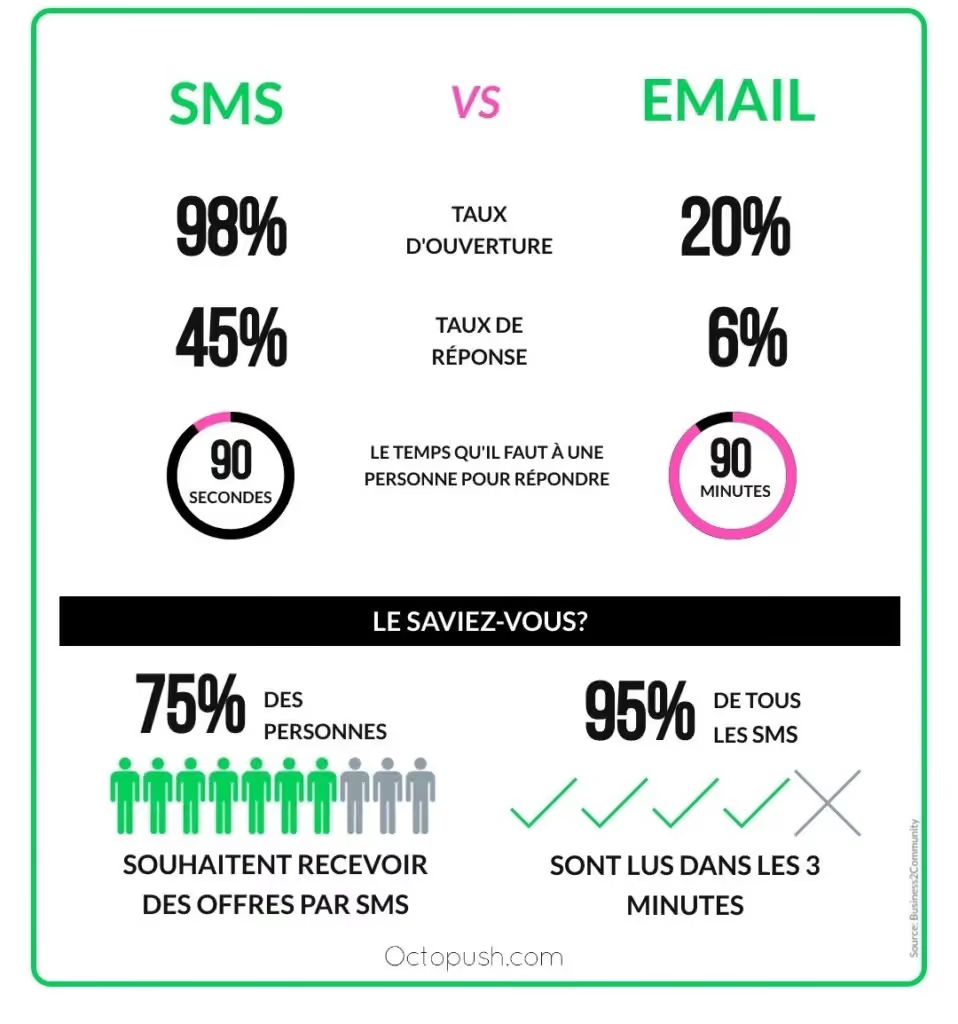
As you can see in the infographics, the SMS open rate is nearly 100%, which is 80% higher than the email open rate. On average, people respond 40% more to an SMS compared to an email, and it only takes them 90 seconds to do so. For emails, it can take up to 90 minutes. Furthermore, 75% of people are willing to receive SMS offers that they would read within the first 3 minutes of receiving them, in 95% of cases.
Surprised? You should be! Now it’s time for you to launch your SMS marketing strategy, and automate it!
What is automation?
To continue with automation, we’re going to answer the first thing that comes to mind: what is it? Automation is a way to replicate processes that you would normally perform manually and define a workflow to do so. We say it’s the way to go because they:
- require very little effort to set up
- save you a lot of time, since you no longer have to perform repetitive tasks
- reduce the possibility of (human) error.
In this post, you will find our guide to conquering automation with the application called Zapier (you might know it from our previous tutorial, How to send automatic meeting reminders via SMS). It serves as a bridge to over 2,000 applications (and you surely use a few of them for your e-commerce).
In this case, we are going to show you how to trigger SMS messages directly from 3 e-commerce giants: Facebook Lead Ads, Shopify, and Intercom.
We promise it will be a relief for your SMS marketing efforts, but since technology can sometimes be tricky, here is how to make each connection (or Zap, as they call it) with Octopush SMS explained from start to finish.
Automation #1: Facebook Lead Ads
You have set up your Facebook page and managed to run a few ads to attract the potential customers you want. People seem to be responding quite well to your ad and you are getting a lot of information about your leads, but… how do you get them to buy from you? By developing the relationship they have with your brand.
Here, we will show you how to automatically trigger an Octopush SMS to customers who respond to your Facebook ads. It’s a powerful choice for keeping the conversation flowing, increasing brand awareness, and making SMS the preferred channel for staying in touch.
<span data-mce-type="bookmark" style="display: inline-block; width: 0px; overflow: hidden; line-height: 0;" class="mce_SELRES_start"></span>
Automation #2: Shopify
Do you have a Shopify store? This tutorial is for you. About 60% of carts are abandoned by customers, but you can do something about it. In this tutorial, we show you how to automatically send an SMS to bring your customers back, remind them that their items are waiting for them, and help them complete their purchase.
And here is the good news: you can use this same workflow for many other events that happen on your Shopify store. You can set up automations to send yourself an SMS whenever you receive a new customer, a new order, or a cancelled order. This way, you can stay in touch with your customers and be informed about what is happening in your store.
Automation #3: Intercom
The king of customer communication unfortunately does not offer SMS from its platform, but you can certainly send SMS to your customers using this tutorial. We will see how to trigger SMS from Octopush to every new Intercom user so you can surprise your new customers with a welcome message, a discount coupon, or an exclusive offer. This way, you will be in immediate contact with your customers, letting them know they haven't gone unnoticed and establishing SMS as a way to receive news from you.
You can also use this tutorial to set up different workflows. As with Shopify, you can configure it to keep you informed about what is happening in your store. For example: instead of sending a new SMS every time you get a new user in Intercom, you can modify it to send yourself an SMS whenever you receive a new unsubscription, a new conversation, or a new lead. This way, you will never miss a thing!
In a nutshell
Now that you know the benefits of using SMS marketing for your e-commerce, you can start trying new methods to make your efforts yield better results. Automation is a very useful tool you can use to convert your leads into customers without having to write all your messages, while still maintaining that sense of closeness in your customer relationship.
Have you tried other automation methods? Would you like to learn how to do more with us? Just leave a comment or send us a message using this form. We would be happy to help!